
If you did not receive the activation/renewal SMS code for a domain in the pp.ua zone, you can activate the domain an alternative way.
To do this, you need to have the Telegram messenger installed on your phone. Or use the WEB version at https://web.telegram.org
For authorization, use the phone number specified in the
domain owner’s data at registration.
You can get the code in Telegram using the @ppuabot bot. To do this, follow the link — https://t.me/ppuabot — or find it using search. Then click the “Start” button or send the /start command.
Note that the Telegram account must be registered to the phone number specified in the registrant’s (owner’s) data.

Next, select the “Activate domain” function.
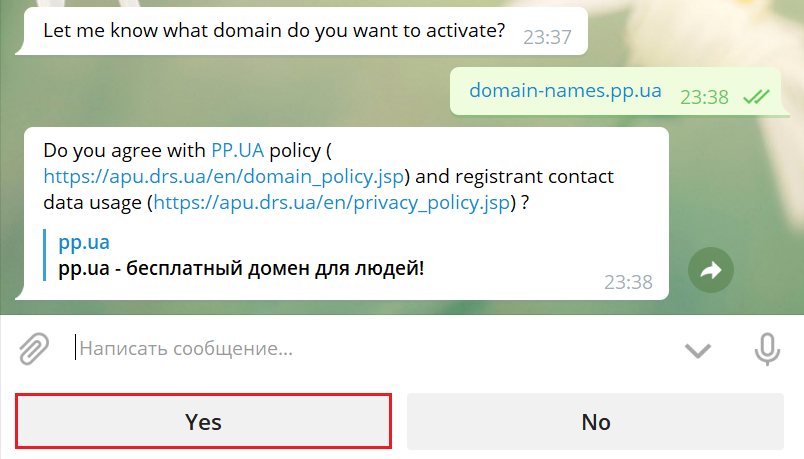
Then review the .PP.UA domain policy and the agreement on providing contact data. Then click the “Yes” button.
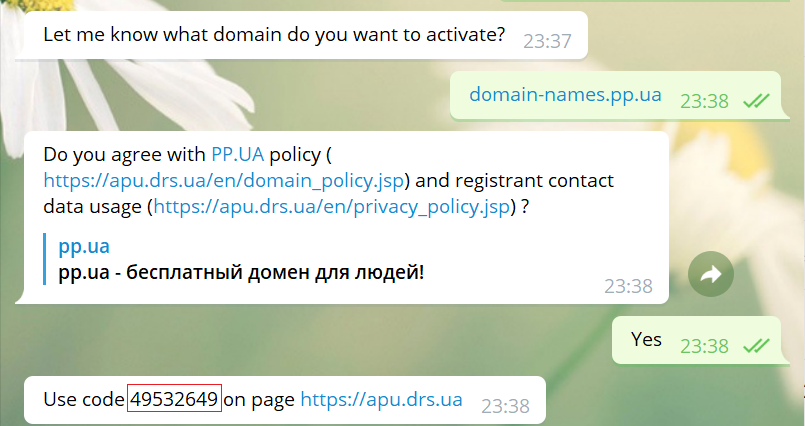
You will then receive a code and a link from the bot to the form for activating the domain name.
Please note: requests to the .PP.UA registry are only valid for five days. If activation is not completed within 5 days, the request will be rejected and the desired changes will not take place (domain registration/renewal/owner change or data edit).
After these steps, the domain will be activated automatically.