
How to choose hosting for a website when the server should be in Europe or the USA? Start with where your audience is, then check the disks, PHP versions, backups, SSL and support. Below are 9 criteria, a table to help you pick the server location, and a checklist that takes 10 minutes before you order.
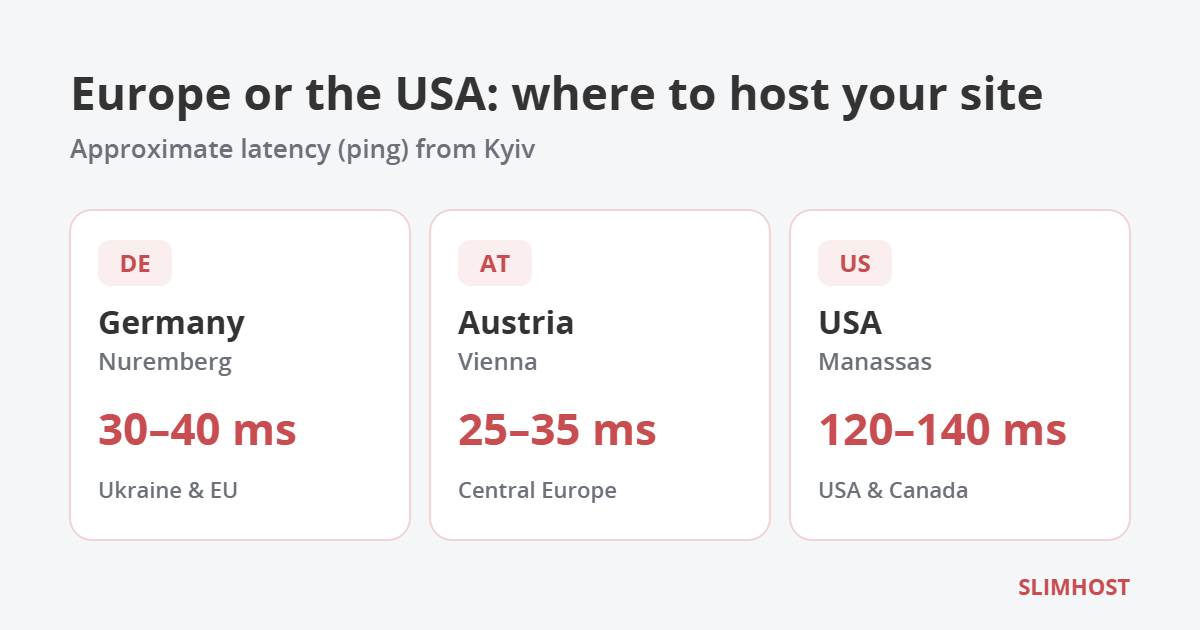
Table of Contents
Why a Ukrainian website may need hosting in Europe or the USA
A server abroad is first of all about stability and speed for the right audience:
- No dependence on power outages. Data centers in Germany, Austria and the USA have redundant power, so the site stays online even during blackouts in Ukraine.
- Speed for EU visitors. If your customers are in Poland, Germany or Czechia, a server in Central Europe answers them faster than a server in Kyiv.
- GDPR requirements. For a business processing data of EU citizens, keeping data inside the EU makes it easier to comply with the General Data Protection Regulation (GDPR).
- US audience. For sales in the USA and Canada, a server on the US East Coast cuts latency several times over.
Europe or the USA: how to choose the server location
The main rule: the server should be close to most of your visitors. Approximate latency (ping) from Kyiv:
| Location | Ping from Kyiv (approx.) | Best for |
|---|---|---|
| Germany, Nuremberg | 30–40 ms | Ukraine, Poland, Germany, the whole EU |
| Austria, Vienna | 25–35 ms | Ukraine, Central and Southern Europe |
| USA, Manassas (Virginia) | 120–140 ms | USA, Canada, international projects |
If most visitors come from Ukraine and the EU, choose Germany or Austria: for a visitor the difference from a Ukrainian data center is barely noticeable. The USA makes sense when North America brings more than half of your traffic. For global projects, a server in Europe can be combined with a CDN.
9 criteria: how to choose hosting without mistakes
1. Data center location
See the table above. Ask the provider for the exact city, not just “Europe”: there is a latency difference between Frankfurt and London too.
2. Disk type: NVMe instead of SSD and HDD
NVMe drives handle file and database requests several times faster than regular SSDs, and HDDs are no longer worth considering for websites. This is especially noticeable for WordPress and online stores, where every page means dozens of MySQL queries.
3. Current PHP versions
Check whether you can choose the PHP version in the control panel and whether current versions are available. Officially supported versions are listed on php.net: old versions get no security fixes. Good hosting gives you a choice — a new version for fresh projects and an older one for legacy sites while you update them.
4. Plan resources
Look not only at disk space but also at the number of sites, the PHP memory limit (memory_limit), CPU time and the number of files. A business card site needs 2 GB of disk and 512 MB of PHP memory, while a WooCommerce store should start from 1 GB of memory.
5. Backups
The minimum is daily backups kept for at least two weeks, plus the ability to restore the site yourself from the panel. Check whether backups are stored on a separate server and whether restoring costs extra.
6. Free SSL
HTTPS is required by browsers and is a signal for search engines. A Let’s Encrypt certificate should be issued and renewed automatically. A paid SSL is needed for organization validation or for protecting all subdomains (Wildcard).
7. Server response time
Google recommends keeping time to first byte (TTFB) under 0.8 seconds. It depends on the disks, the web server (for example, OpenLiteSpeed), HTTP/3 support and caching. Take a trial period and measure your own site’s speed.
8. Technical support
24/7 support, answers in your language and several channels: tickets, chat, email. Test it before buying — send a question and see how long you wait for an answer.
9. Price, payment and trial period
Look at the renewal price, not just the first month: some providers give a discount at the start and raise the price later. It is convenient when you can pay in hryvnias by card, via Privat24 or monobank, and test the hosting for free before paying.
Shared hosting or VPS
Shared hosting suits most websites: business card sites, blogs, corporate sites and small stores. The provider manages the server, and you manage your sites through the control panel.
A VPS is needed when the project grows: high load, your own software, special server settings, a VPN or Docker. You get guaranteed resources and root access, but you also configure the server yourself.
Checklist: how to choose hosting in 10 minutes
- Find out where most visitors come from and choose the server location.
- Count your sites, files and databases — take a plan with 30–50% headroom.
- Check for NVMe drives and available PHP versions.
- Ask how often backups are made, how long they are kept and whether you can restore the site yourself.
- Make sure SSL is free and renews automatically.
- Compare the renewal price, not only the first period.
- Use the trial period and measure your site’s speed.
- Ask whether they will move your site from the old provider for free.
SLIMHOST hosting in Europe and the USA
SLIMHOST runs shared hosting on servers in Germany (Nuremberg), Austria (Vienna) and the USA (Manassas). Every plan includes:
- NVMe drives, the HestiaCP control panel, Apache or OpenLiteSpeed web server of your choice, HTTP/3;
- PHP version selection in the panel, including PHP 8.5;
- free Let’s Encrypt SSL certificates for all sites;
- daily backups kept for 14 days, restorable from the panel;
- free website transfer from another provider;
- a 7-day trial period without payment.
Plans start at 85 UAH/month when paid yearly, and with a 12-month order you get a domain as a gift. If you need guaranteed resources, see VPS in Germany and Finland on KVM with AMD processors, and for paid certificates — SSL from 250 UAH/year.
Frequently asked questions
Will a site on a server in Germany be slow for visitors from Ukraine?
No. Latency from Kyiv to Nuremberg is roughly 30–40 ms, and visitors won’t notice it. Disks, PHP version and caching affect site speed much more.
Can I move a site from Ukrainian hosting to European hosting?
Yes. The site is copied to the new server while the old hosting keeps working until you switch DNS, so there is no downtime. At SLIMHOST the transfer is free.
What should I choose for a WordPress online store?
Shared hosting with NVMe drives, at least 1 GB of PHP memory and daily backups. If you have tens of thousands of products or heavy traffic, choose a VPS.
Does the domain have to be in the same country as the server?
No. A .com.ua or .ua domain can point to a server in any country: hosting location and domain zone are not related.