
Types of SSL certificates differ in two ways: what the certificate authority checks before issuing (DV, OV or EV) and how many addresses one certificate covers (single-domain, Wildcard or multi-domain). Encryption is the same for all of them — the difference is what information about the site owner is verified and how long issuance takes. Below we go through each type in practice: how validation works, what visitors see and when paying more makes no sense.
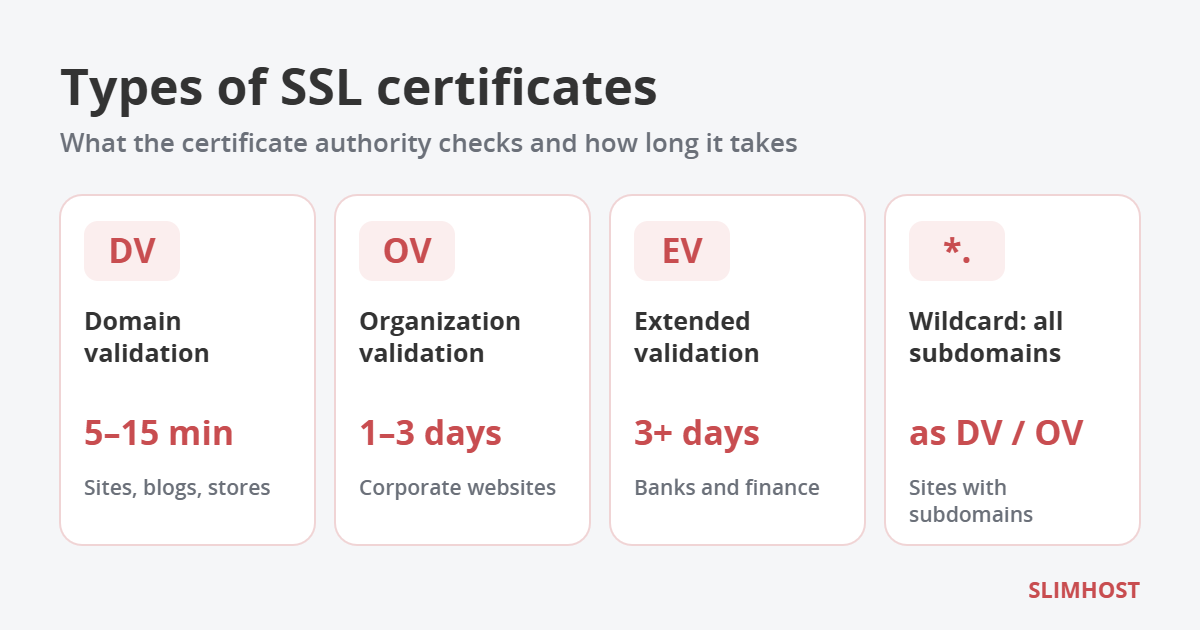
Table of Contents
First things first: all types of SSL certificates encrypt the same way
Any valid certificate gives the same level of data protection. Technically the protocol in use today is TLS, not SSL, but the old name stuck. A free Let’s Encrypt certificate and an EV certificate costing dozens of times more encrypt traffic equally well, using modern algorithms with RSA 2048-bit or ECC keys. The only way types of SSL certificates differ is how thoroughly the owner is checked and which domains the certificate covers.
Types of SSL certificates by validation level
DV — domain validation
The certificate authority (CA) confirms only one thing: you control the domain. No documents are needed and no person is involved. You can prove control in three ways:
- Email — a message with a link is sent to admin@, webmaster@ or another service address of the domain;
- DNS — you add a TXT or CNAME record with a given value to the domain zone;
- HTTP file — you place a file in a specific folder of the site, and the CA opens it by a direct link.
If DNS or the file is set up correctly, the certificate is issued within minutes. It lists only the domain — no company name. That is enough for blogs, business card sites, landing pages, most online stores and web services.
OV — organization validation
On top of the domain check, the company itself is verified. The CA matches the name, address and registration details against official registries or business databases such as Dun & Bradstreet, and calls the company’s phone number from a public directory to confirm the order. If the registry data is up to date, this takes 1–3 business days.
As a result, the certificate gets an “Organization” field with the owner’s legal name. Visitors see the same padlock as with DV, but the company name is visible in the certificate details. These are the types of SSL certificates that some partners, tender platforms and corporate security policies require.
EV — extended validation
The strictest level under CA/Browser Forum rules. Besides registration, the CA confirms that the company actually operates and has a physical address, and that the person ordering the certificate is authorized to do so. A letter from a lawyer or accountant is often required. Issuance takes from several days to two weeks.
EV used to give a “green bar” with the company name in the address bar, and that was why people bought it. In 2019 Chrome (version 77) and Firefox (version 70) removed this indicator, so visitors can no longer tell EV from DV at a glance. EV makes sense where regulators, payment partners or internal rules explicitly require it: banks, financial and insurance companies, large payment services.
Types of SSL certificates by number of domains
The second split is by the number of addresses. These types of SSL certificates can be combined with any validation level, with a few limits for Wildcard.
Single-domain
Protects one address, usually in two variants — example.com and www.example.com. The most common choice for a single website.
Wildcard
A certificate for *.example.com protects all first-level subdomains: shop.example.com, mail.example.com, api.example.com — however many there are, including ones you add later. An important detail: the asterisk covers only one level, so a.shop.example.com is not covered by such a certificate. Most commercial CAs add the base domain example.com automatically, but check this in the description of the specific certificate.
Wildcard certificates come at DV or OV level; industry rules do not allow EV Wildcard. You can get a free Wildcard from Let’s Encrypt, but only with DNS validation, so automatic renewal requires API access to your DNS.
Multi-domain (SAN, UCC)
One certificate for several different domains, for example example.com, example.net and example-shop.com.ua. Convenient when one company runs several sites or brands and does not want to track a dozen separate certificates. Usually a few domains are included in the price, and each additional one is paid separately. There is also a hybrid — multi-domain Wildcard — combining both approaches.
Comparison of SSL certificate types
All types of SSL certificates at a glance:
| Type | What the CA checks | How long it takes | What the certificate shows | Best for |
|---|---|---|---|---|
| DV | Control over the domain | From a few minutes | Domain only | Sites, blogs, stores |
| OV | Domain and company registration | 1–3 business days | Domain and company name | Corporate sites, B2B, tenders |
| EV | Domain, company, its operations and the requester’s authority | Several days to 2 weeks | Domain, company, jurisdiction | Banks, finance, payment services |
| Wildcard | Same as DV or OV | Same as DV or OV | *.domain | Sites with many subdomains |
| Multi-domain | Same as DV, OV or EV | Same as DV, OV or EV | List of domains | Several sites of one company |
How to choose an SSL certificate: 5 questions
Different types of SSL certificates solve different tasks, so start with five simple questions:
- How many addresses do you need to protect? One site — a single-domain certificate; many subdomains — Wildcard; several different domains — multi-domain.
- Does anyone require company validation? If a partner, bank or tender documents explicitly mention OV or EV, choose that level. Otherwise DV is enough.
- How fast do you need HTTPS? DV is issued in minutes, OV and EV in days, so for a launch “by tomorrow” only DV will do.
- Who will take care of renewals? Validity periods are getting shorter (see below), so automation or a provider that reissues the certificate for you matters.
- Do you need a financial warranty? Paid certificates come with a CA warranty in case of the CA’s error, and the amount grows from DV to EV. For most sites this is not the main factor, but for financial services it is a strong argument.
Common SSL myths
There is still a lot of outdated advice about the types of SSL certificates:
- “OV or EV improves Google rankings.” No. Google considers whether a site uses HTTPS, not the certificate type.
- “A free certificate is less secure.” No. Encryption is the same; validity period, support and warranty differ.
- “Visitors can tell DV from EV.” Since 2019, practically not: the padlock in the browser looks the same.
- “A Wildcard protects everything on the domain.” Only one level of subdomains.
Validity periods: what changes from 2026
The CA/Browser Forum — an association of certificate authorities and browser vendors — is gradually shortening the maximum validity of public certificates:
- from March 15, 2026 — up to 200 days;
- from March 15, 2027 — up to 100 days;
- from March 15, 2029 — up to 47 days.
These limits apply to all types of SSL certificates — DV, OV, EV and Wildcard. You can still buy a certificate for a year or longer, but within the subscription it will have to be reissued several times. So when choosing a provider, check whether it handles reissuance for you. Details are on the CA/Browser Forum website.
How to identify the type of SSL certificate on a site
You can tell the types of SSL certificates apart on your own or any other site in a minute, without special knowledge:
- Click the icon to the left of the site address in your browser and open the connection and certificate details.
- Look at the Subject field. If it lists only the domain (CN=example.com), it is DV. If there is a company name (O=…), it is OV. If jurisdiction and registration number are also listed, it is EV.
- The Subject Alternative Name field shows which domains the certificate covers: an entry like *.example.com means Wildcard, several different domains mean multi-domain.
- The same window shows who issued the certificate (Let’s Encrypt, Sectigo, DigiCert, etc.) and until when it is valid.
Administrators can check the same from a terminal:
openssl s_client -connect example.com:443 -servername example.com </dev/null 2>/dev/null | openssl x509 -noout -subject -issuer -dates -ext subjectAltNameThe command prints the owner, issuer, validity dates and the list of domains in the certificate.
What to prepare for OV and EV
Unlike DV, these types of SSL certificates require preparation. To get through validation without delays, take care of the following in advance:
- Up-to-date registry data. The company name, address and phone in the order must match the official registry. The most common cause of delays is an old address or phone number in directories.
- A working company phone. The certificate authority calls the number from a public source, not the mobile number from your order.
- Access to the domain’s email or DNS — to prove control over the domain, just like with DV.
- For EV — proof of authority of the person ordering the certificate, and often a letter from a lawyer or accountant confirming company details.
- A certificate signing request (CSR) with the exact legal name in the Organization field. It is generated on the server or in the hosting control panel.
If everything is ready, OV is usually issued within 1–3 business days and EV within a week. Mistakes in the data can stretch the process to several weeks, so check the registry before you submit the order.
How much different types of SSL certificates cost
The price depends on the validation level, the number of domains and the certificate authority brand:
- Free DV — Let’s Encrypt: no financial warranty and a short validity period, but perfectly fine for most sites.
- Paid DV — the most affordable commercial option. At SLIMHOST — from 250 UAH per year.
- Wildcard — in our price list it costs roughly 8–11 times more than DV of the same brand. Worth it when you have many subdomains or add them often.
- OV — more expensive than DV because of the manual company check.
- EV — the most expensive: the price covers the most thorough validation and the largest warranty.
Pay more only for what brings real value: company validation when it is required, or a Wildcard when you have many subdomains. For other sites a paid DV or even a free Let’s Encrypt certificate is the right choice among all types of SSL certificates.
SSL certificates at SLIMHOST
On SLIMHOST shared hosting a free Let’s Encrypt certificate is enabled for every site and renewed automatically. If you need a paid certificate, the SSL certificates section offers two popular types of SSL certificates:
- DV for one domain — GoGetSSL Domain SSL, Sectigo PositiveSSL, RapidSSL Standard, from 250 UAH per year;
- Wildcard for all subdomains — GoGetSSL Wildcard, Sectigo PositiveSSL Wildcard, RapidSSL Wildcard.
The certificate is issued within minutes after domain validation, and we install and reissue it for free — including the reissues now required by shorter validity periods.
Frequently asked questions
Which SSL certificate does an online store need?
For most stores DV is enough: more expensive types of SSL certificates do not encrypt customer data any better, and payment systems work on their side with their own certificates. Consider OV if the store sells to businesses or a partner requires it.
Can I switch from DV to OV without downtime?
Yes. The new certificate replaces the old one, and visitors will not notice the change. Just order OV in advance, because company validation takes several days.
Does a Wildcard cover the base domain?
For most commercial Wildcard certificates, yes — example.com is added automatically. Check this in the description of the specific certificate before buying.
Do types of SSL certificates affect site speed?
No. Setting up a secure connection takes a fraction of a second and depends on server settings — HTTP/2 or HTTP/3, session caching — not on the validation level. All types of SSL certificates are equally fast.
What happens if the certificate expires?
Browsers show a full-page warning “Your connection is not private”, and most visitors leave. That is why you need automatic renewal or a reminder well in advance.